




How a laser-scattering PM2.5 sensor counts particles, what the PMS5003 datasheet promises, how to parse its 32-byte frame on an ESP32, and why humidity limits low-cost sensors.
The average human hair is about 70 micrometers across, which the EPA puts at 30 times the diameter of the largest fine particle. Those fine particles are what a PM2.5 sensor is built to count, and a hobbyist can read them with a module the size of a matchbox and a microcontroller.
This post explains how that module measures, what its datasheet promises, and where the promise runs out. A build outline for an ESP32 follows, with a frame parser written against the manufacturer’s byte layout.
What PM2.5 means
The EPA defines PM2.5 as fine inhalable particles with diameters generally 2.5 micrometers and smaller, and PM10 as inhalable particles generally 10 micrometers and smaller. The agency says the finest particles pose the greatest risk to health. Its primary annual PM2.5 standard is set at 9.0 micrograms per cubic meter (reconsideration page cited below).
The unit is mass per volume of air, micrograms in a cubic meter. A sensor never weighs anything, though. It infers mass from light, and that inference is where the trouble starts.
How a laser-scattering particle sensor works
The Plantower PMS5003 datasheet, hosted by Smart Citizen, states the principle in one sentence: a laser illuminates airborne particles, a detector collects the scattered light over time, and a microprocessor calculates the equivalent particle diameter and the number of particles per unit volume using Mie theory.
So the raw measurement is a count by size. The module reports particles above 0.3, 0.5, 1.0, 2.5, 5.0 and 10 micrometers per 0.1 liter of air, and separately reports mass concentrations for PM1.0, PM2.5 and PM10. The datasheet gives a counting efficiency of 50% at 0.3 µm and 98% at 0.5 µm and above, so the smallest bin is undercounted by design. Mass figures are computed from counts, not weighed.
Reading the datasheet
| Item | Datasheet value |
|---|---|
| PM2.5 effective range | 0 to 500 µg/m³ |
| Resolution | 1 µg/m³ |
| Consistency error, 0 to 100 µg/m³ | ±10 µg/m³ |
| Consistency error, 100 to 500 µg/m³ | ±10% |
| Single / total response time | under 1 s / 10 s or less |
| Supply | 5.0 V typical, 4.5 to 5.5 V |
| Current | 100 mA or less active, 200 µA or less standby |
| Serial | 9600 baud, no parity, 1 stop bit |
| Operating humidity | 0 to 99% RH |
Two details deserve a second look. The accuracy figure is labeled maximum consistency error, a measure of how well units agree under test conditions, and it says nothing about agreement with a reference monitor in your kitchen. And the datasheet asks for at least 30 seconds after waking from sleep before trusting the data.
The data frame is 32 bytes: start characters 0x42 and 0x4D, a length word of 0x001C (28, which is 2 × 13 + 2), thirteen 16-bit data words and a 2-byte checksum equal to the sum of every preceding byte. Words 1 to 3 are PM1.0, PM2.5 and PM10 under the label CF=1, words 4 to 6 repeat them for atmospheric conditions, and words 7 to 12 are the particle counts per 0.1 L. The datasheet supplies both sets of mass values and this post does not rank them; whichever you log, log the choice.
Build outline: PMS5003 and an ESP32
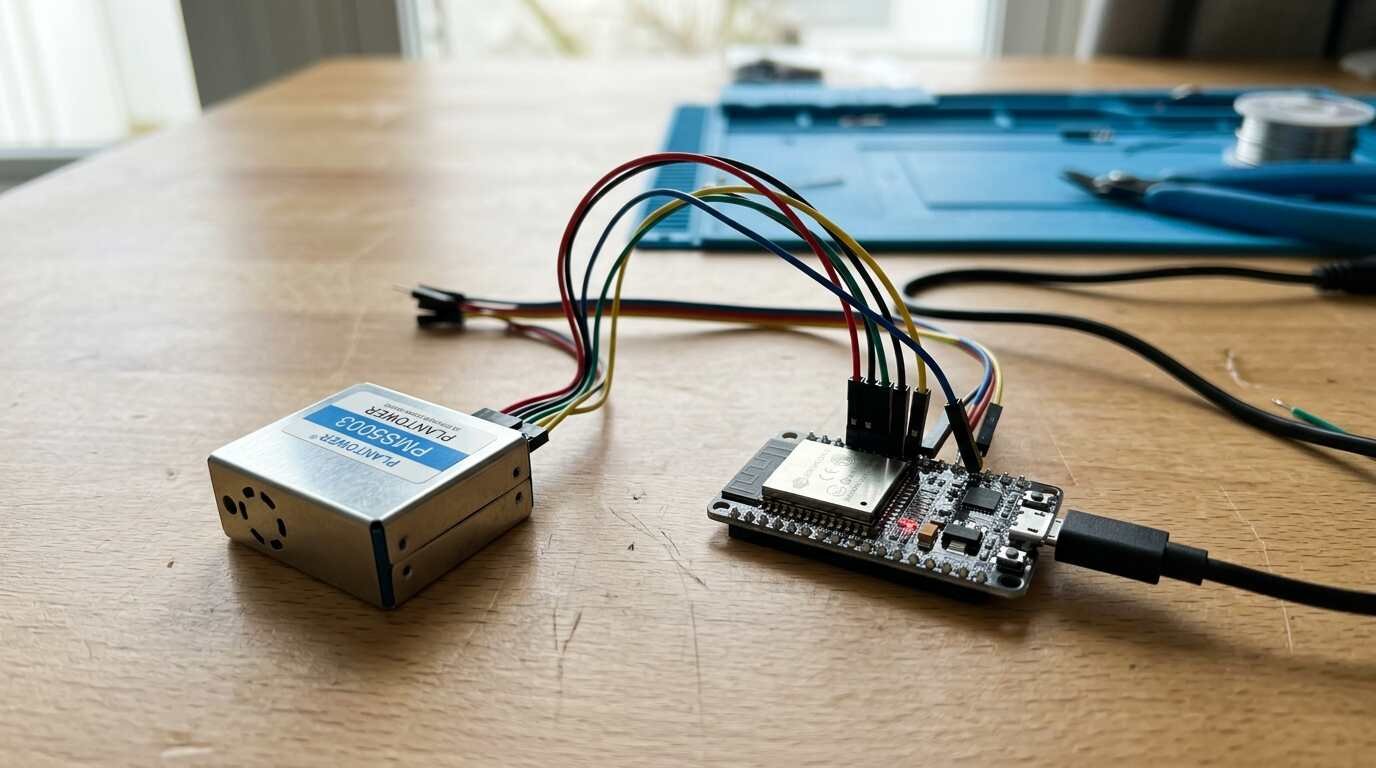
- A PMS5003 module with its cable or breakout board, and an ESP32 development board. No specific retail listing is linked, because none could be verified against the retailer’s page.
- Power the sensor from 5 V; the datasheet allows 4.5 to 5.5 V.
- Wire the sensor’s TX line to an ESP32 input pin, and ground to ground.
- Optionally wire SET to a spare output pin: high or floating is normal operation, low is sleep. The datasheet specifies 3.3 V TTL for SET and RESET, and both are pulled up internally.
On the Arduino-ESP32 core, HardwareSerial::begin() takes the baud rate, the frame configuration, then the RX and TX pins, as declared in the core’s header. The sketch below uses the second UART with 9600 baud and 8N1, matching the datasheet. It scans for the 0x42 0x4D header, reads the remaining 30 bytes and accepts the frame only if the checksum matches.
#include <Arduino.h>

constexpr int PMS_RX = 16;   // ESP32 pin wired to sensor TX
constexpr int PMS_TX = 17;   // ESP32 pin wired to sensor RX
uint8_t buf[32];

bool readFrame() {
  while (Serial1.available() >= 32) {
    if (Serial1.read() != 0x42) continue;
    if (Serial1.read() != 0x4D) continue;
    buf[0] = 0x42; buf[1] = 0x4D;
    Serial1.readBytes(buf + 2, 30);
    uint16_t sum = 0;
    for (int i = 0; i < 30; i++) sum += buf[i];
    uint16_t check = (buf[30] << 8) | buf[31];
    return sum == check;
  }
  return false;
}

// data word n (1-based): high byte first, starting at byte 4
uint16_t dataWord(int n) {
  return (buf[4 + 2 * (n - 1)] << 8) | buf[5 + 2 * (n - 1)];
}

void setup() {
  Serial.begin(115200);
  Serial1.begin(9600, SERIAL_8N1, PMS_RX, PMS_TX);
}

void loop() {
  if (readFrame()) {
    Serial.print("PM2.5 CF=1: ");
    Serial.print(dataWord(2));
    Serial.print("  atmospheric: ");
    Serial.println(dataWord(5));
  }
}
From there, add a timestamp and send the values to whatever collects them, such as a small server on a Raspberry Pi home server. Sleeping the module between readings saves power but means discarding the first 30 seconds after each wake.
From counts to something readable
The count fields are easy to misread. They are tallies per 0.1 liter, the datasheet’s standard volume. A reading of 300 for particles above 0.3 µm means 300 per 0.1 L, which scales to 3,000 per liter and 3,000,000 per cubic meter, since a cubic meter holds 1,000 liters. Multiply by ten for liters before comparing with other instruments, and by ten thousand for cubic meters.
Counts and mass answer different questions. A single PM2.5 number collapses the size distribution, while the six count channels keep it. Logging a couple of them beside PM2.5 preserves information you cannot reconstruct later from the mass figure alone.
The response times set the pace. The datasheet puts a single response at under 1 second and a total response at 10 seconds or less, so, as a reasonable reading of those figures, logging faster than every few seconds adds little new information. Averaging a minute of frames before logging smooths the jitter and keeps the file small.
Limits of low-cost sensors
Humidity is the largest known error source. A peer-reviewed paper on calibrating PurpleAir sensors names ambient relative humidity the primary source of measurement error and blames hygroscopic growth, particles taking up water and scattering as if they were bigger. It cites an earlier AQ-SPEC evaluation that found an overestimation of 40% against reference monitors, and says the nonlinear effect emerges around 50% RH.
Researchers correct for it with a regression against reference data. One published form, the Barkjohn model, is PM2.5 = 5.72 + 0.524 × PA − 0.0852 × RH, where PA is the raw reading. For a raw 20 µg/m³ at 70% RH it gives 5.72 + 10.48 − 5.964, about 10.2 µg/m³. Those coefficients were fitted to PurpleAir units, so a bare PMS5003 may need its own fit; the datasheet itself offers no humidity correction.
The paper’s fitted models landed within the EPA’s performance target for sensors, an RMSE of 7 µg/m³ or less and R² of 70% or more, but only after correction and only against nearby reference monitors. The practical path is to run your sensor beside an official monitor or a trusted unit for a few weeks, fit a correction, and publish the number with the caveat attached. Reading specifications this closely pays off elsewhere too; the same habit explains the fine print on laser distance measurers and the sensor claims in our look at an acoustic camera.
Parts list
- PMS5003 Digital Particle Concentration Laser Sensor/High Precision Laser Sensor to Detect Air Quality Suitable for Smart Home: A PMS5003 module, the sensor this build reads over its serial interface. See it on Amazon (affiliate link)
As an Amazon Associate I earn from qualifying purchases. A commission may be earned if you buy through this link, at no extra cost to you.
Sources