

A plush creature the color of bubble gum sits in the middle of a black screen, and when the cursor drags across it the coat parts like a real one. That is the whole pitch of the x9m8 Fur Simulation, a browser toy that renders tens of thousands of individual hairs, moves them with a physics pass on the graphics card, and lights each strand with a model borrowed from the research on human hair.
It runs in the frame below. Drag across the creature to comb it, click it to boop it, and orbit with the mouse.
A full-window version lives at apps.x9m8.com/fur-simulation, and the complete source is public in the x9m8/fur-simulation repository on GitHub.
What the simulation puts on screen
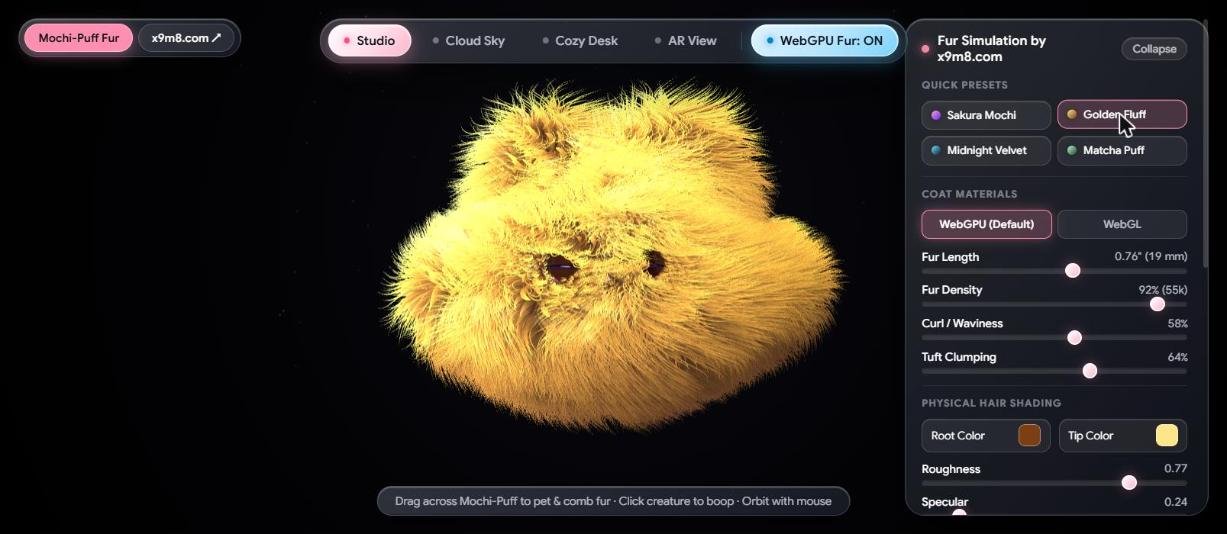
The creature is a stylized blob, a round mochi-like body with two small eyes, chosen because a simple silhouette lets the fur do the talking. Four presets set the whole coat in one click: Sakura Mochi (the pink-violet default), Golden Fluff, Midnight Velvet and Matcha Puff. Under the presets sit sliders for fur length, density, curl or waviness, and tuft clumping, followed by a block of hair-shading controls for root color, tip color, roughness and specular strength.
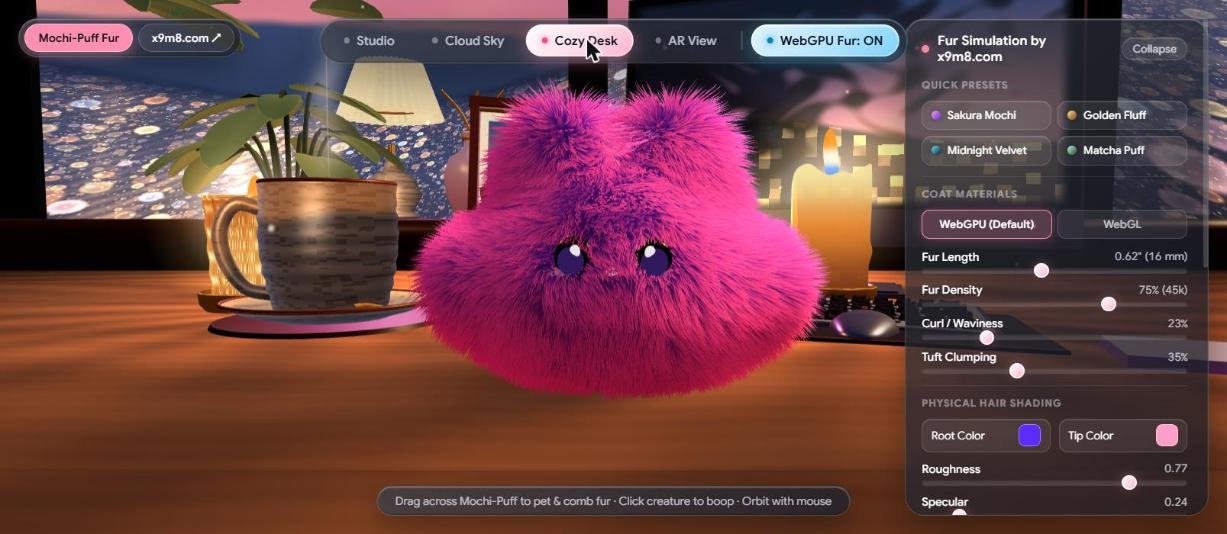
Four scenes change the lighting around the animal. Studio is a black cyclorama with a key light and a rim light. Cloud Sky puts the creature against blue sky. Cozy Desk drops it onto a table beside a plant, a mug and a candle at dusk. A fourth scene, AR View, is built to composite the creature over a live camera feed; it asks for camera permission, and the x9m8 team has not reviewed it for this post, so treat it as an extra rather than a feature to count on.
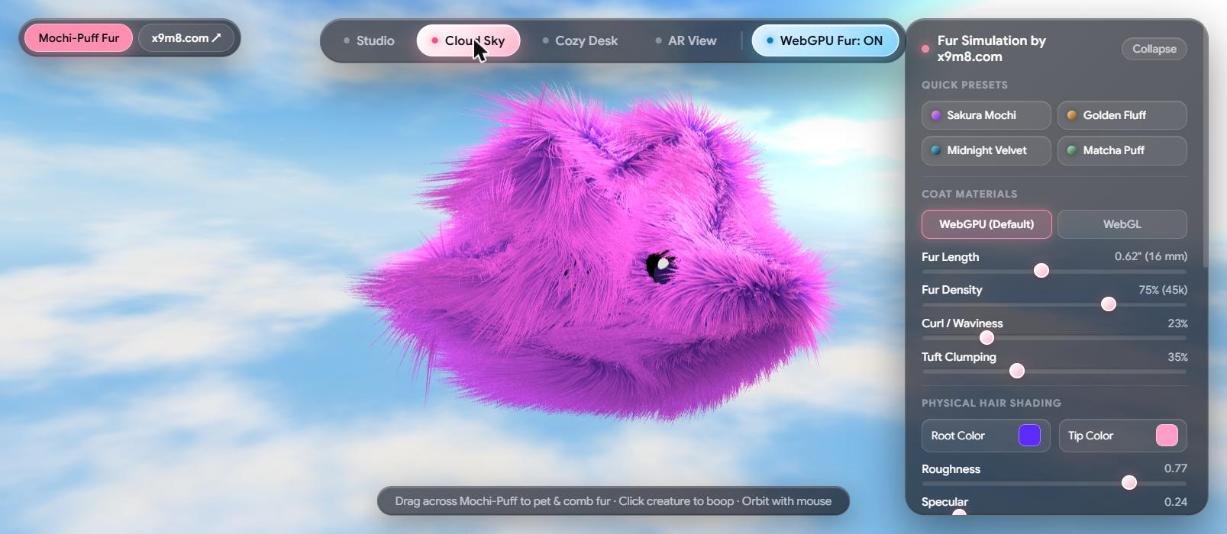
Change a scene and the fur changes its mood with it. In the black studio the strands read as bright tips on dark roots. Against open sky they pick up a cooler, flatter fill. On the desk the candle warms one side of the body while the window behind it lays a pink-blue wash across the other.
Why fur is expensive to draw
A polygon is cheap. A coat of fur is a different animal: thousands of hairs, each thinner than a pixel at normal viewing distance, each partly transparent, each shadowing its neighbors. Drawing them as real geometry strand by strand was far too slow on graphics hardware of the early 2000s, so researchers looked for shortcuts.
The best-known one came from Jerome Lengyel, Emil Praun, Adam Finkelstein and Hugues Hoppe, who presented real-time fur over arbitrary surfaces at the Symposium on Interactive 3D Graphics in 2001. Their method simulates hair with a particle system, samples it into a volume texture, and then draws the fur as a stack of concentric, semi-transparent shells around the model. Extra flat cards called fins, stood up at right angles to the surface, rescue the look near the silhouette, where stacked shells otherwise fall apart into visible layers.
Shells remain a staple of game graphics because they cost little. Their weakness is exactly the one the 2001 authors patched with fins: viewed edge-on, a shell stack looks like a stack.
How this app builds the coat
The Fur Simulation uses shells and then goes a step further. According to its own source, the full-quality mode stacks 64 shell layers over the body and adds up to 60,000 instanced strands on top. Each strand is a tapered ribbon built from 20 segments, so it can bend along its length instead of behaving like a stiff spike. The strands start from root positions scattered over the body, each carrying its own grooming direction, clump offset and random seed, which is what keeps neighboring hairs from moving in lockstep.
Motion comes from a physics pass that runs on the GPU. The source describes a Verlet integration step, the same family of integrator used for cloth and rope, in which each point remembers where it was a moment ago and infers its velocity from that. Wind adds gusts, and a drag of the cursor pushes the hairs aside; the controls expose wind strength, gustiness and frequency in the code, even where the panel keeps the interface simple.
Not every machine can carry that load, so a lighter fallback exists. In the WebGL mode the app drops to 32 shells and 26,000 strands and skips the GPU physics pass. Density is a live slider in both modes, so the number of hairs on screen can be changed on the fly.
The light model: from Kajiya-Kay to Marschner
Geometry is half the story. The other half is how a single hair answers light, and here the app leans on published research. For years the standard shortcut was the Kajiya-Kay model, which treats a hair as a thin cylinder and produces one broad highlight. A 2003 SIGGRAPH paper by Steve Marschner, Henrik Wann Jensen, Mike Cammarano, Steve Worley and Pat Hanrahan, Light Scattering from Human Hair Fibers, argued that this misses visible effects. Their measurements, including scattering out of the plane that earlier studies ignored, showed multiple specular highlights and scattering that changes as the fiber rotates about its axis. The paper explains those effects by modeling a hair as a transparent elliptical cylinder with an absorbing interior and a surface of tilted scales.
The Fur Simulation does not implement the full Marschner model, and it does not claim to. Its shader header describes a hair shading function that combines a Kajiya-Kay style longitudinal lobe with several Marschner-inspired terms. A primary reflection lobe is shifted toward the root, a second lobe standing in for light that bounces inside the fiber is shifted toward the tip and tinted by the hair pigment, and a transmission lobe adds the glow of light passing through thin hair from key and rim lights. A Beer-Lambert style absorption term darkens the deep layers of the coat, and a follicle ambient-occlusion term darkens the roots.
The roughness slider is wired to the longitudinal exponent, mapping a range from 0.05 to 0.95 onto exponents running from 220 down to 10. At low roughness the highlights are tight and glassy; push it up and they spread into a soft sheen. Because the two reflection lobes sit at different tilts, the highlight splits into a bright primary streak and a colored secondary one, the doubled look that the 2003 paper set out to explain.
The distinction matters for how far to trust the pictures. The result is a believable stylized coat, a good teaching aid for how highlights stack in hair, and not a physically exact measurement of any real animal.
A short video on the shell idea
For a 27-second look at the shell technique itself, this clip from the Gamelogic channel shows how stacked layers read as fur.
Video: Gamelogic, “Exploring Shell Texturing – a Shader Technique for Fur Effects.”
Things worth trying
- Click each of the four presets in turn; they change length, density, curl, clumping and color together, so the same body reads as a different animal.
- Move one preset between Studio, Cloud Sky and Cozy Desk and watch how the lighting changes the tint of the hair tips.
- Pull the roughness and specular sliders in opposite directions and look at how the highlights tighten or spread.
- Drag across the body to comb the coat, then click the creature to boop it.
Readers who want the physics of light transport behind all of this will find it in a textbook on physically based rendering. The fourth edition of Physically Based Rendering: From Theory to Implementation, by Matt Pharr, Wenzel Jakob and Greg Humphreys (MIT Press, 2023), is the current edition of a well-known title in the field. See it on Amazon (affiliate link).
As an Amazon Associate I earn from qualifying purchases. A commission may be earned if you buy through this link, at no extra cost to you.
How it was built, and where it fits
The app was generated and refined in Google AI Studio with Gemini, then exported to GitHub and published to the x9m8 apps site. It is one more entry in a growing set of in-browser simulations from the same site: Kinetic Shapes for bouncing balls in spinning polygons, Gravity Lab for N-body orbits, the double pendulum for chaos, and the reaction-diffusion simulator for Turing patterns. Fur sits at the visual end of that family, where the question shifts from what a system does to how it looks.
A note on the opening photograph: it is an AI-generated image of a backlit fur surface, included to show what the simulation is reaching for, and it is not a capture from the app. The three screenshots in the article are taken from the live simulation.
Sources
- Marschner, Jensen, Cammarano, Worley and Hanrahan, “Light Scattering from Human Hair Fibers,” SIGGRAPH 2003
- Lengyel, Praun, Finkelstein and Hoppe, “Real-time fur over arbitrary surfaces,” I3D 2001
- x9m8/fur-simulation source code, GitHub
- Gamelogic, “Exploring Shell Texturing – a Shader Technique for Fur Effects,” YouTube