




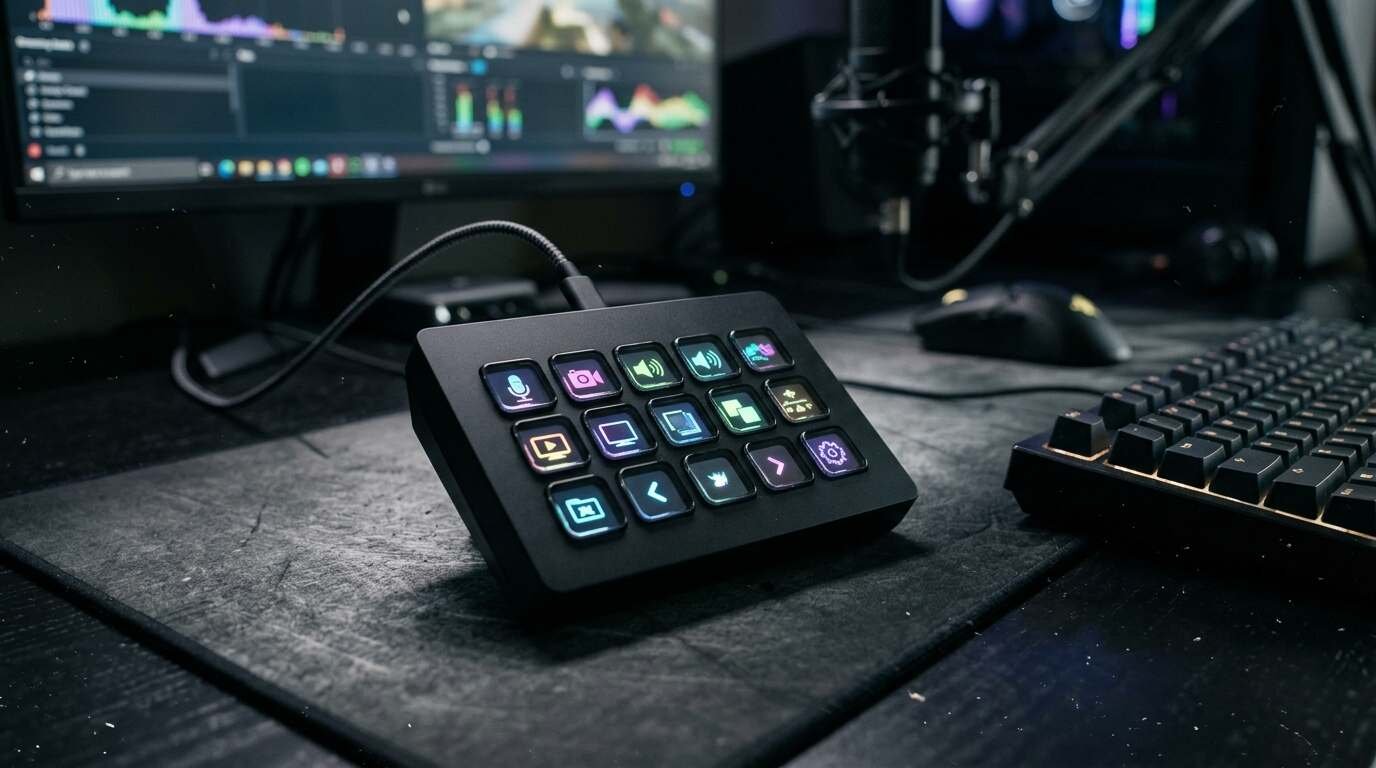
The Stream Deck MK.2 is a 15-key macro pad that reviewers like for streamers and remote workers. It has cramped labels, a light stand and little new for first-gen owners.
As an Amazon Associate I earn from qualifying purchases. A commission may be earned if you buy through this link, at no extra cost to you.
This Elgato Stream Deck MK2 review is for anyone who has watched a streamer tap a grid of glowing keys and wondered whether it is worth owning. The MK.2 is a 15-key macro pad, with an LCD screen under every key, that launched in 2021. It was built with streamers in mind, yet remote workers use it for muting calls and launching apps. I haven’t tested this unit; this review is based on published tests and shopper feedback. Most of the full reviews are five years old, which is worth keeping in mind as you read.
What the MK.2 is, and who it is for
Each of the 15 keys is a small display. In the free Stream Deck app you assign an action to each one: switch an OBS scene, mute a microphone, open a program, run a script, post to Twitch. A plugin store supplies icons, sounds and integrations, including OBS, Twitch and Zoom, per Windows Central and Prima Games.
| Spec | Detail |
| Keys | 15 LCD keys, 3 rows of 5 |
| Size | 118 x 84 x 25 mm without stand |
| Weight | 145 g without stand; 270 g with stand |
| Connection | USB-C port at USB 2.0 speed; detachable 150 cm USB-C cable |
| Stand | Removable magnetic stand, fixed at about 45 degrees |
| Faceplate | Interchangeable; extras sold separately |
| System needs | Windows 11 or newer, macOS 13 or newer (Elgato) |
The naming has shifted. Elgato’s own US store page now calls this hardware the OG 15-Key Control Pad with Classic Keys, which uses membrane switches, while Elgato’s comparison page and retailers still say MK.2. A deal article also mentions white and scissor-key variants. I could not verify what the scissor-key version is, or whether it replaces this one, so check the product title before you order.
The natural buyer is a first-time macro pad owner. Streamers, people with a day full of video calls, and anyone who likes a physical grid of one-press shortcuts for apps, scripts and audio or camera toggles.
What Amazon shoppers say
The Amazon listing carries a large body of shopper feedback. Elgato’s own store sells the same hardware, so compare the Amazon price with Elgato’s before you buy.
Amazon’s summary of shopper comments calls the device high quality and easy to set up, with ample buttons and a huge number of available commands. Buyers find it useful for streaming and also for everyday work, saying it boosts their workflow. Two themes are mixed. Some see good value while others do not. And on reliability, one buyer reports that it works with OBS, while another says it stopped working after a month.
Reliability reports of that kind are hard to weigh. Forum threads about the Stream Deck stopping, such as one on the OBS Studio forum about it failing when OBS runs as Administrator, exist, but I did not read enough of them to tie a pattern to the MK.2. I did not check a Google or Google Shopping rating for this post, and shoppers can compare it themselves.
What independent reviewers found
Tom’s Hardware called it easy to use and a strong macro pad for streamers, with Twitch and OBS support and swappable faceplates. It suggested the pad may be more than a beginner needs, and noted the absence of an audio dial and of native Adobe support. No numeric score was visible.
Laptop Mag gave it an Editor’s Choice badge, recommending it for serious streamers on the strength of its software and design. Its gripes were cramped key labels, glare on the glossy keys and the price. That review dates from October 2021.
Windows Central treated it as the obvious pick for someone starting out in streaming, while telling owners of the first generation not to bother upgrading. Price and thin Adobe integration were the main complaints.
Prima Games described a modest refresh: a better cable, stand and faceplates, but unchanged software and the same USB 2.0 speed. It called the pad a solid mid-range first purchase that also suits non-streaming work.
For a view from outside the streaming world, Lester Chan’s blog describes an owner working from home, with no regrets, using it for Zoom shortcuts and app launching. The only complaint was a stand too light to resist key presses. I found no 2026 hands-on review.
What it does well
- Setup. Laptop Mag found configuration simple, with a built-in store for plugins, icons and sounds.
- Fixes over the original. A detachable USB-C cable and swappable faceplates answered two earlier complaints, per Windows Central and Prima Games.
- Range of use. It works for Zoom, app launching and scripts, not only streaming.
- Stand. Prima Games found the fixed 45-degree stand sturdier than the first-generation kickstand, and the unit slightly smaller and lighter.
- Price. It is often discounted below Elgato’s list price, per Digital Citizen.
The practical appeal is speed, and it is the main thing the product sells. Anything repeated through the day gets shorter. The work-from-home owner quoted below found the same benefit with Zoom and app launching.
Put differently: the pad does not do anything you cannot do with keyboard shortcuts, but it puts them where you can see them. The practical appeal is speed. Anything you do repeatedly, such as muting a call, switching a scene or opening the same five apps, collapses into a single press. That is hard to appreciate until you try it.
Where it falls short
The USB port runs at USB 2.0 speed, which Prima Games and Elgato’s spec page both state. For a device that sends small commands, that rarely matters, but some buyers expect better.
Adobe support is the clearest software gap. Windows Central and Tom’s Hardware both flag weak video-editing integration, with no native plugins for Adobe apps.
Keys have limits too. Laptop Mag found only about 9 to 10 characters of label fit on a key, text can look distorted on the curved surfaces, and the glossy finish catches glare.
The stand is light plastic and slides when you press the keys, according to the Lester Chan blog, whose author skipped the sticky pad.
There is also the price question. Windows Central and Laptop Mag both call it expensive next to a basic macro keyboard. And because the software and function are essentially unchanged from the earlier model, Prima Games and Windows Central see a weak upgrade case for first-generation owners.
A few practical points on the Windows and Mac sides. Elgato’s spec page lists Windows 11 or newer and macOS 13 or newer, which may rule out an older computer. If your machine is a few years old, check this before you buy. The software is free, so there is no subscription to budget for.
The age of the evidence deserves a plain mention. Tom’s Hardware, Laptop Mag, Windows Central and Prima Games all reviewed the pad around its 2021 launch. Software has surely moved on since then, so their praise of the app describes what existed at the time. Whether the hardware changed under Elgato’s new OG label, I could not verify.
Video reviews
Three independent videos follow, including one that compares the MK.2 directly with the original. I haven’t verified the makers or watched them end to end, so use them as extra viewing.
How it compares
Elgato sells several siblings. The Stream Deck Neo has 8 keys plus 2 touch points. Digital Citizen lists it as the lower-cost option, and it suits anyone who needs only a handful of shortcuts.
At the other end, the Stream Deck XL offers 32 keys at a higher price, giving room for larger layouts. And the Stream Deck + has 8 keys with 4 dials and a touch strip, per Elgato’s comparison page, which makes it a better fit for audio and mixer-style control.
I could not confirm that the MK.2 is still Elgato’s newest 15-key design, only that it remains on sale. A basic macro keyboard costs less, and Windows Central and Laptop Mag use it as the yardstick when calling the Stream Deck expensive, but I have not researched specific models.
Who should buy it, and the verdict
Buy it if you stream, spend much of your day in video calls, or run the same apps and scripts repeatedly, and you like the idea of a physical key grid. Skip it if you want dials or a touch strip, need fewer or many more keys, or already own the first-generation unit.
My take is that the MK.2 earns its place as a first macro pad. Reviewers agree it is easy to live with, and Amazon shoppers call it high quality. The caveats are real but contained: cramped labels, a light stand, thin Adobe support and an upgrade case that is close to nil for existing owners. Reliability reports are mixed, though I could not trace them to a pattern. Check the model name on the listing, and once it is discounted below list it is a fair deal for the right person.
- The Elgato Stream Deck MK.2 is a 15-key LCD macro pad that suits streamers and heavy video-call users who want one-press shortcuts. See it on Amazon (affiliate link)
As an Amazon Associate I earn from qualifying purchases. A commission may be earned if you buy through this link, at no extra cost to you.