




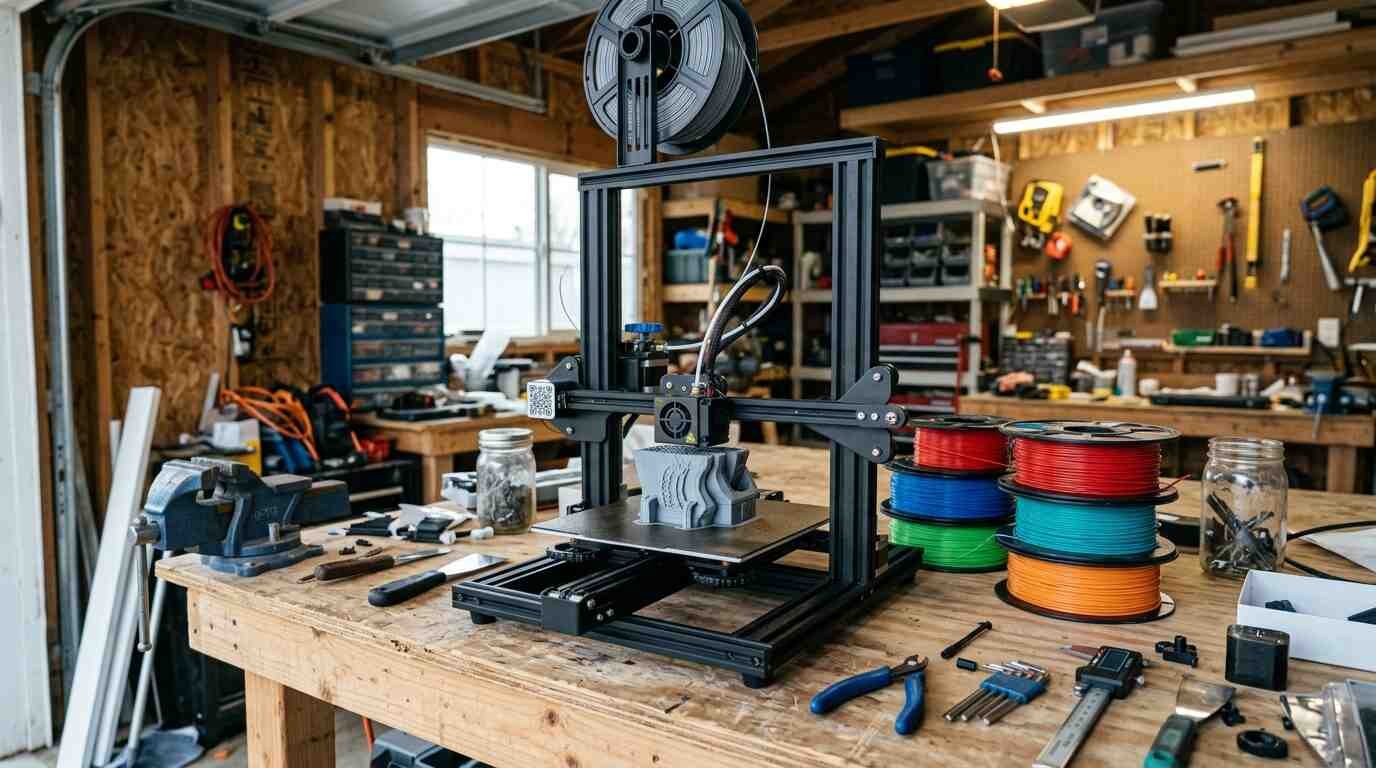
A budget 3D printer with auto leveling and a direct-drive extruder. Reviewers like the value and easy assembly, and mark it down for no Wi-Fi, a sticky plate and basic cooling.
As an Amazon Associate I earn from qualifying purchases. A commission may be earned if you buy through this link, at no extra cost to you.
This Creality Ender-3 V3 SE review looks at a budget 3D printer that packs auto leveling and a direct-drive extruder into a budget price. I haven’t tested this unit; this review is based on published tests and shopper feedback. Check the current price on Amazon before buying. The listing is also a bundle, and I could not confirm what the bundle contains.
What the Ender-3 V3 SE is and who it is for
Creality released it in 2023; 3DPros lists July 2023, while Tom’s Hardware reviewed it in September of that year. It is a Cartesian printer with a 220 x 220 x 250 mm build volume, a Creality Sprite direct-drive extruder and a CR Touch probe that builds a 16-point mesh. HowToMechatronics adds a strain-gauge sensor for automatic Z-offset.
| Build volume | 220 x 220 x 250 mm |
| Speed | 250 mm/s advertised; roughly 150-180 mm/s typical in tests |
| Acceleration | 2500 mm/s2 maximum |
| Leveling | CR Touch, 16-point mesh, plus strain-gauge Z-offset |
| Extruder | Direct drive, Creality Sprite |
| Temperatures | 260 C nozzle, 100 C bed |
| Build plate | PC-coated flexible magnetic steel sheet |
| Display | 3.2-inch non-touch color screen with knob |
| Connectivity | SD card and USB-C; no Wi-Fi |
The target is plain: beginners and budget buyers who want a mostly pre-assembled printer for PLA, PETG and TPU, and who are fine carrying files over on an SD card.
What Amazon shoppers say
Here I have little to offer. Amazon has not generated a summary of customer comments for this listing, and the amount of shopper feedback is small. I will not guess at themes. Because this is a bundle listing, I would not read its feedback as a verdict on the printer alone.
For that reason this review leans on independent testers and on forum threads. A Google or Google Shopping rating was not checked either, so shoppers who want more shopper-side data can compare it themselves.
What independent reviewers found
Tom’s Hardware gave its review a headline about topping 200 mm/s on a budget and called the printer a strong, easy budget machine for beginners that borrows features from Creality’s pricier models. It noted that the K1 and Elegoo’s Neptune 4 are faster. It criticized the sticky build plate and the missing Wi-Fi.
HowToMechatronics ran test prints from 60 to 250 mm/s. The results looked good for the price, and the reviewer says it is worth buying for beginners and tight budgets. Heating is slow, and there is no filament runout sensor.
Clever Creations scored it 4.0 out of 5 and called it simple, reliable and cheap, with cut corners in cooling and plastic construction. It considers the printer the best choice at this price.
The Phonograph found it the easiest printer to assemble of any it had tested. It reported good first layers and quiet running, with minor stringing and unreliable time estimates. The site gives category scores of 4.25 to 5 but no overall number.
WeMustBeGeeks lists it in its 2026 budget roundup, praising the large community, yet it picks the Bambu Lab A1 mini as the first printer to buy because of speed.
What it does well
Price against features is the main argument. Tom’s Hardware and Clever Creations both stress that auto leveling and a direct-drive extruder are not usually found together at this level.
Assembly is fast, around 10 to 15 minutes according to Tom’s Hardware and HowToMechatronics. Out of the box, the leveling and automatic Z-offset gave good first layers, per The Phonograph and HowToMechatronics. For a newcomer, a decent first layer is half the battle.
Direct drive handles TPU well, according to Tom’s Hardware and 3DPros. That opens flexible filament to a printer at a price that would not normally include it.
Speed holds up reasonably. HowToMechatronics found quality good up to roughly 120 mm/s and acceptable at 250 mm/s in one test. Tom’s Hardware, though, puts typical real-world speeds nearer 150 to 180 mm/s, so read the 250 as a ceiling.
In my view, this is a printer to buy for what it removes: no hand leveling, no assembly marathon, no fuss over the first layer.
Where it falls short
There is no Wi-Fi. Files move by SD card or USB, per Tom’s Hardware and 3DPros. After a week of walking a card back and forth, that feels dated.
The build plate sticks hard and is awkward to clean and to take prints off, according to both Tom’s Hardware and 3DPros. Cooling relies on a single small part-cooling fan, and Clever Creations and Tom’s Hardware saw some stringing on detailed prints.
Heat-up is slow, and there is no filament runout sensor, per Clever Creations and HowToMechatronics. Construction is mostly plastic and the screen is non-touch and knob-driven, as Clever Creations and The Phonograph note.
Materials are limited as well. HowToMechatronics says ABS and nylon need upgrades.
Complaints from forums
A forum thread on Creality’s own site describes prints that slow to a near stall, with beeping on thin walls. One user traced it to Creality Print 4.3.8, and others saw it in version 5.0. Other slicers did not reproduce the slowdown, which suggests the cause sits in slicer software rather than the printer itself.
An r/Creality thread, read through a mirror site and dated December 2024, describes first-layer defects appearing after a few days of good prints. Suggested fixes included raising the Z-offset by about 0.03 mm, tightening hardware and recalibrating flow. Other Creality forum posts mention filament that stops extruding mid-print, with no confirmed cause.
All of this is anecdotal. Forum threads over-represent problems, since happy owners rarely post. Still, they show where to look first if a print goes wrong.
Notice the pattern. Nobody in the independent coverage says the printer is bad. The criticism is about omissions: Wi-Fi, a runout sensor, better cooling, a nicer plate. Those are the corners a budget price pays for, and for a beginner they read as annoyances, not dealbreakers. The forum posts are a different matter, because a slicer slowdown or a failed first layer can sour a new user quickly.
Weighing the sources against each other, the independent reviewers agree on more than they disagree about. Tom’s Hardware, HowToMechatronics, Clever Creations and The Phonograph all describe an easy, capable machine for beginners, and they name the same weak points: the plate, the cooling and the missing conveniences. Only WeMustBeGeeks steers a first-time buyer elsewhere, and its reason is speed and setup rather than any defect in this printer. That makes the Ender-3 V3 SE a safe pick on the evidence, though not the only sensible one.
Video reviews
Three independent videos cover the printer, including one on a year of use. I could not verify the channels or the content, because the pages were not accessible during research; the titles come from search results.
A note on speed claims. The advertised 250 mm/s is a peak, and Tom’s Hardware measured typical output nearer 150 to 180 mm/s, partly because acceleration tops out at 2500 mm/s2. That is quick for a printer of this class but slower than the newer Klipper machines the same reviewer points to. For a first printer, it is fast enough.
How it compares
WeMustBeGeeks names the Bambu Lab A1 mini as its top first-printer pick, citing faster and easier setup. If your budget reaches that far, it is the obvious rival.
Tom’s Hardware suggests the Elegoo Neptune 4, which runs Klipper and is faster, and the Sovol SV07 or AnkerMake M5C for buyers who want more speed. I did not check current prices for any of them.
The trade is familiar: the Ender-3 V3 SE is simpler and cheaper, while the alternatives are quicker. Which matters more depends on whether you are printing for fun or for volume.
Verdict: who should buy it, and who should skip
Buy it if you are a beginner or on a tight budget, and you want something close to ready to print for PLA, PETG and TPU. Reviewers consistently describe it as good value.
Skip it if you want Wi-Fi, multicolor, enclosed-printer materials or the speed of a Klipper machine. Skip it also if the Bambu Lab A1 mini fits your budget, since one 2026 roundup prefers it.
Price evidence is scattered: Tom’s Hardware, WeMustBeGeeks and 3DPros each quote different figures from different years, and the Amazon listing is a bundle, so compare contents before comparing prices.
Plan for small extras. With no Wi-Fi you will want a reliable SD card or a USB drive, and the sticky plate argues for patience when removing prints. Neither cost is priced in the research.
My take: it is an honest budget printer with a few cut corners, and the cut corners are mostly the ones you can live with.
- Creality Ender-3 V3 SE (bundle listing; check contents): a budget printer with auto leveling and a direct-drive extruder, best for beginners and tight budgets. See it on Amazon (affiliate link)
As an Amazon Associate I earn from qualifying purchases. A commission may be earned if you buy through this link, at no extra cost to you.